When Should You Use AI? A Decision Framework for AI PMs
Just because you can add AI to your product doesn't mean you should.
The Problem With "AI-Powered Everything"
I've sat in enough roadmap reviews to recognize the pattern. Someone watches a competitor announce an AI feature. The CEO forwards the press release with a single line: "Can we do this?" By the next sprint planning, three features have been reframed as "AI-powered." Nobody asks whether they should be.
This is the product management equivalent of what developers call "resume-driven development" - adding technology because it sounds impressive, not because it solves a real problem better than the alternative.
The result is predictable: features that are slower, more expensive, less reliable, and harder to explain than the traditional approach they replaced. Users don't care that your search bar uses a large language model. They care that it finds what they're looking for.
It's important to ask a simple question: when should a developer reach for AI versus writing traditional code? The answer was a decision tree built around five questions. The same logic applies to product decisions - but the questions look different when you're a PM.
You're not deciding whether to write a function or call an API. You're deciding whether to build a feature that relies on AI at all, what kind of AI capability it requires, how it fits into the user experience, and whether the tradeoffs are worth it. The stakes are higher, the variables are different, and the failure modes are more expensive.
This framework is built for that decision.
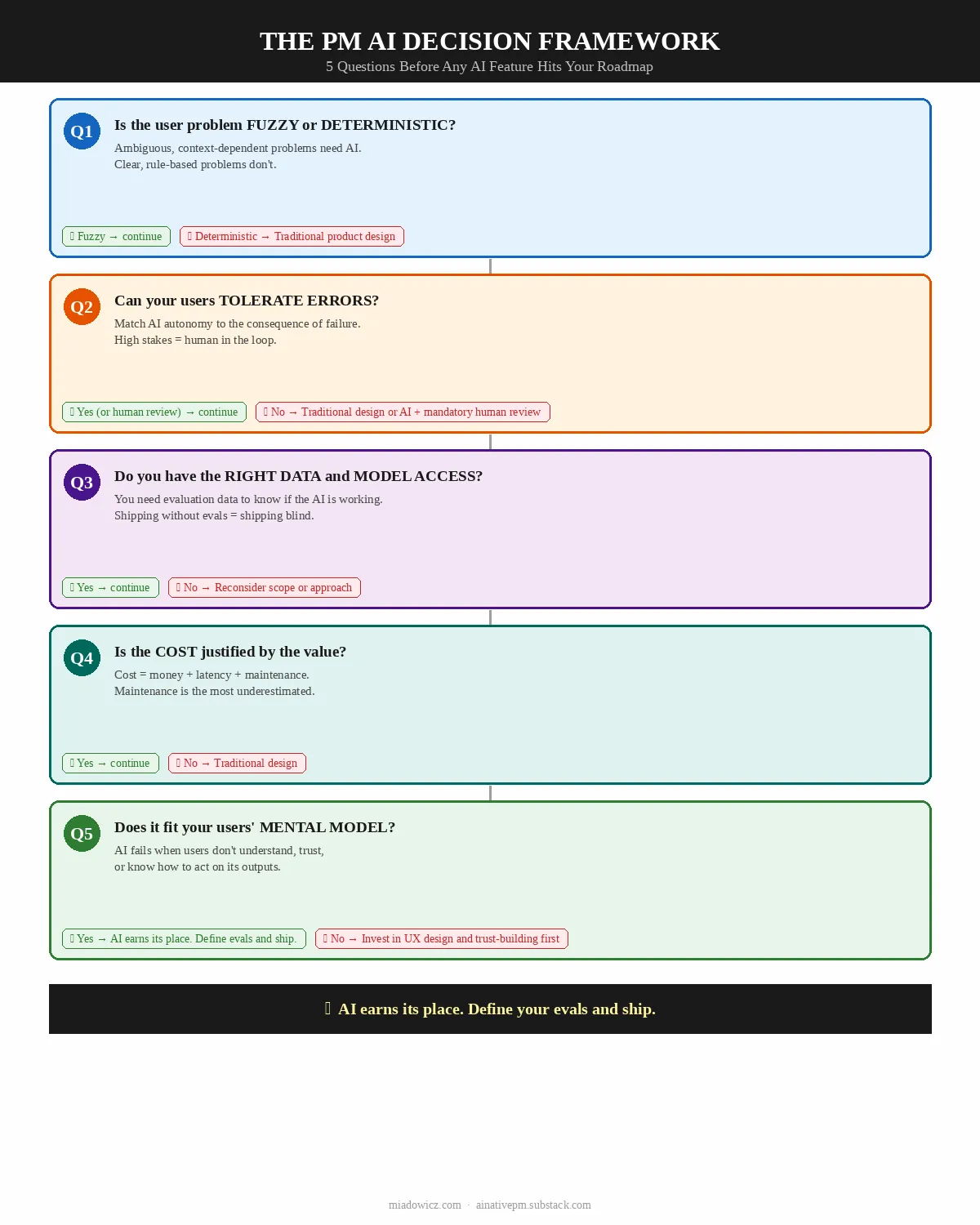
The PM's AI Decision Framework: 5 Questions
Run every potential AI feature through these five questions before it touches a roadmap.
Question 1: Is the User Problem Fuzzy or Deterministic?
This is the foundational question - and the one most PMs skip.
Fuzzy problems are ambiguous, context-dependent, and resistant to explicit rules. The user's need cannot be fully specified in advance. The right answer depends on nuance, context, and interpretation. These are the problems where AI earns its place.
Deterministic problems have clear, predictable logic. The right answer is always the same given the same inputs. These problems are better solved with traditional product design - clear UI, explicit rules, reliable logic.
Key Insight: If you can solve the user problem with a well-designed form, a filter, or a clear information hierarchy, you don't need AI. You need better product design.
The distinction matters because AI introduces uncertainty by definition. A language model is a probabilistic system - it produces outputs that are likely, not guaranteed. When the user problem requires certainty (show me my account balance, confirm my booking, validate my input), probabilistic outputs are a liability, not a feature.
| Fuzzy - AI is the right tool | Deterministic - Use traditional product design |
|---|---|
| "Help me write a performance review for my direct report" | "Show me all performance reviews submitted this quarter" |
| "Summarize the key decisions from this 40-page PRD" | "Sort these PRDs by last modified date" |
| "Find products similar to this one I liked" | "Filter products by price range and category" |
| "Suggest a response to this customer complaint" | "Route this complaint to the correct support queue" |
| "Extract the key requirements from this user interview transcript" | "Count how many user interviews were conducted this month" |
Real-World PM Example:
You're building a feature for a project management tool. Two options on the table:
[Wrong] AI-powered task creation: users describe their task in natural language and the AI creates it. Why it's wrong: Creating a task is deterministic. The user knows what they want to create. A well-designed form with smart defaults is faster, more reliable, and less error-prone than natural language parsing.
[Right] AI-powered task breakdown: user describes a high-level goal and the AI suggests a breakdown into subtasks. Why it's right: Breaking a goal into tasks is genuinely fuzzy - it requires judgment, context, and knowledge of the project. AI adds real value here.
Question 2: Can Your Users Tolerate Errors?
AI makes mistakes. The question is not whether your AI feature will produce wrong outputs - it will. The question is what happens when it does.
Think of error tolerance as a spectrum defined by two dimensions: reversibility (can the user undo the AI's action?) and consequence (what is the cost of a wrong output?).
| Error Tolerance | Reversibility | Consequence | AI Approach |
|---|---|---|---|
| High | Fully reversible | Low (cosmetic, informational) | AI can act autonomously |
| Medium | Partially reversible | Moderate (workflow disruption) | AI suggests, user confirms |
| Low | Difficult to reverse | High (financial, reputational, legal) | AI assists, human decides |
| None | Irreversible | Critical (safety, compliance, security) | No AI in the decision path |
The Autonomy Spectrum:
The right level of AI autonomy in your feature design is determined by error tolerance. A feature where errors are low-consequence and reversible can let the AI act without user confirmation. A feature where errors are high-consequence or irreversible should require explicit user approval before any action is taken.
This is not a binary choice. The most sophisticated AI product designs use progressive autonomy - the AI earns more autonomy as it demonstrates reliability in lower-stakes situations.
Real-World PM Example:
You're building an AI feature for a legal document platform:
[Wrong] AI auto-redlines contracts and sends the revised version to the counterparty. Why it's wrong: Irreversible, high-consequence. One hallucinated clause could create legal liability.
[Right] AI suggests redlines that the lawyer reviews and approves before sending. Why it's right: Same AI capability, but with a human in the decision path for the consequential action. The AI speeds up the work; the human owns the outcome.
PM Rule of Thumb: If you would be uncomfortable explaining an AI error to your most important customer, the feature needs human review before action.
Question 3: Do You Have the Right Data and Model Access?
AI features are only as good as the data and models that power them. Before committing to an AI feature, you need to answer three sub-questions:
3a. Does the problem require domain-specific knowledge you own, or can it be solved with a general-purpose model?
Most AI features PMs build today don't require custom training. General-purpose models (GPT-4, Claude, Gemini) are remarkably capable across a wide range of tasks. The question is whether your use case requires knowledge that these models don't have - proprietary data, specialized domain expertise, or real-time information.
3b. Do you have the data to evaluate quality?
This is the question most PMs miss. You can build an AI feature without training data. But you cannot evaluate whether your AI feature is working without evaluation data - a set of inputs and expected outputs that lets you measure whether the model is producing the right results.
If you don't have evaluation data and cannot create it, you cannot know whether your AI feature is working. You're shipping blind.
3c. Can you access the model you need within your constraints?
Cost, latency, data privacy, and regulatory requirements all constrain model access. A feature that requires real-time inference on sensitive user data may not be compatible with sending that data to a third-party API. A feature that needs sub-100ms response times may not be compatible with current LLM latency.
| Situation | Recommendation |
|---|---|
| General task, no proprietary data needed | Use a frontier model API (OpenAI, Anthropic, Google) |
| Task requires proprietary data, but data is structured | RAG (Retrieval-Augmented Generation) with your data |
| Task requires proprietary data, data is unstructured | Fine-tuning or RAG depending on volume |
| Strict data privacy requirements | On-premise or private cloud deployment |
| Real-time requirements (<100ms) | Edge models or cached inference |
| Highly specialized domain with no public training data | Reconsider whether AI is the right approach |
Real-World PM Example:
You're building a feature that recommends relevant internal documents to employees based on their current work context:
[Wrong] Using a general-purpose model without access to your document corpus. Why it's wrong: The model has no knowledge of your internal documents. It will hallucinate or produce generic recommendations.
[Right] Building a RAG system that retrieves relevant documents from your corpus and uses the model to rank and summarize them. Why it's right: The model's language understanding is combined with your proprietary data. The result is genuinely useful.
Question 4: Is the Cost Justified by the Value?
AI features are expensive in ways that traditional features are not. Before committing, you need to account for all three cost dimensions:
Monetary cost: API calls, compute, storage, and the infrastructure to manage them. These costs scale with usage in ways that traditional features don't. A feature that costs $0.01 per user interaction sounds cheap until you have 100,000 daily active users.
Latency cost: AI responses take time - typically 1–10 seconds for a complex LLM call. This is acceptable for some use cases (generating a draft document) and unacceptable for others (autocomplete in a search bar). Latency affects perceived quality, and perceived quality affects adoption.
Maintenance cost: AI features require ongoing maintenance that traditional features don't. Prompts need versioning. Model updates can change behavior unexpectedly. Evaluation pipelines need to be built and maintained. Edge cases accumulate. This is the cost most PMs underestimate.
The value side of the equation is equally important. The right question is not "is this AI feature cool?" but "does this AI feature solve a problem that users have, in a way that is meaningfully better than the alternative, at a cost that is justified by the value it creates?"
| Cost is justified | Cost is NOT justified |
|---|---|
| AI reduces a 2-hour manual task to 5 minutes | AI adds a "smart" label to a feature that already works |
| AI enables a capability that was previously impossible | AI replaces a well-designed UI with a chatbot |
| AI improves conversion on a high-value user journey | AI personalizes content that users don't notice or care about |
| AI reduces support volume on a high-frequency problem | AI generates content that users immediately discard |
The Build vs. Buy vs. Integrate Decision:
| Approach | When to Use | Cost Profile |
|---|---|---|
| API Integration (OpenAI, Anthropic, etc.) | Most cases - general tasks, fast iteration | Low upfront, variable per-use |
| Fine-tuning | Domain-specific tasks with sufficient training data | Medium upfront, lower per-use |
| Custom model | Unique capability, massive scale, strict data requirements | High upfront, lowest per-use at scale |
Real-World PM Example:
You're evaluating an AI feature that generates personalized onboarding checklists for new users:
[Wrong] Building a custom model trained on your user data to generate checklists. Why it's wrong: The cost of custom model development is not justified for a feature that a well-prompted general-purpose model can handle adequately.
[Right] Using a frontier model API with a well-designed prompt that incorporates user role, company size, and stated goals. Why it's right: The value (better onboarding completion) justifies the per-call API cost, and the development cost is minimal.
Question 5: Does This Fit Your Users' Mental Model?
This is the question that distinguishes PM-level AI thinking from developer-level AI thinking. The original framework asked whether the feature needs to work offline. For PMs, the more fundamental question is whether the AI interaction fits the way users think about and expect to interact with your product.
AI features fail not only when they produce wrong outputs, but when they produce outputs in a way that users don't understand, trust, or know how to act on. The mental model question has three dimensions:
5a. Does the AI interaction fit the user's existing workflow?
AI features that require users to change their workflow face adoption barriers that have nothing to do with the quality of the AI. If your users are accustomed to clicking through a structured form, a conversational AI interface may feel disorienting even if it's technically superior.
5b. Can users understand what the AI is doing and why?
Users need to be able to form a mental model of the AI's behavior - not a technical model, but a functional one. They need to understand what kinds of inputs produce what kinds of outputs, when to trust the AI's output and when to verify it, and what to do when the AI is wrong.
5c. Does the AI interaction match the trust level users have in your product?
Trust is contextual. Users who trust your product for low-stakes tasks may not trust it for high-stakes tasks, even if the underlying AI capability is the same. An AI feature that asks users to delegate a high-stakes decision before they've had the opportunity to build trust in the system will fail regardless of its technical quality.
| Mental Model Fit | Recommendation |
|---|---|
| AI fits existing workflow, high explainability, appropriate trust level | Ship with standard UX patterns |
| AI changes workflow, high explainability, appropriate trust level | Invest in onboarding and progressive disclosure |
| AI fits existing workflow, low explainability | Add transparency features (show reasoning, confidence indicators) |
| AI requires trust users haven't built yet | Start with lower-stakes use cases to build trust before expanding |
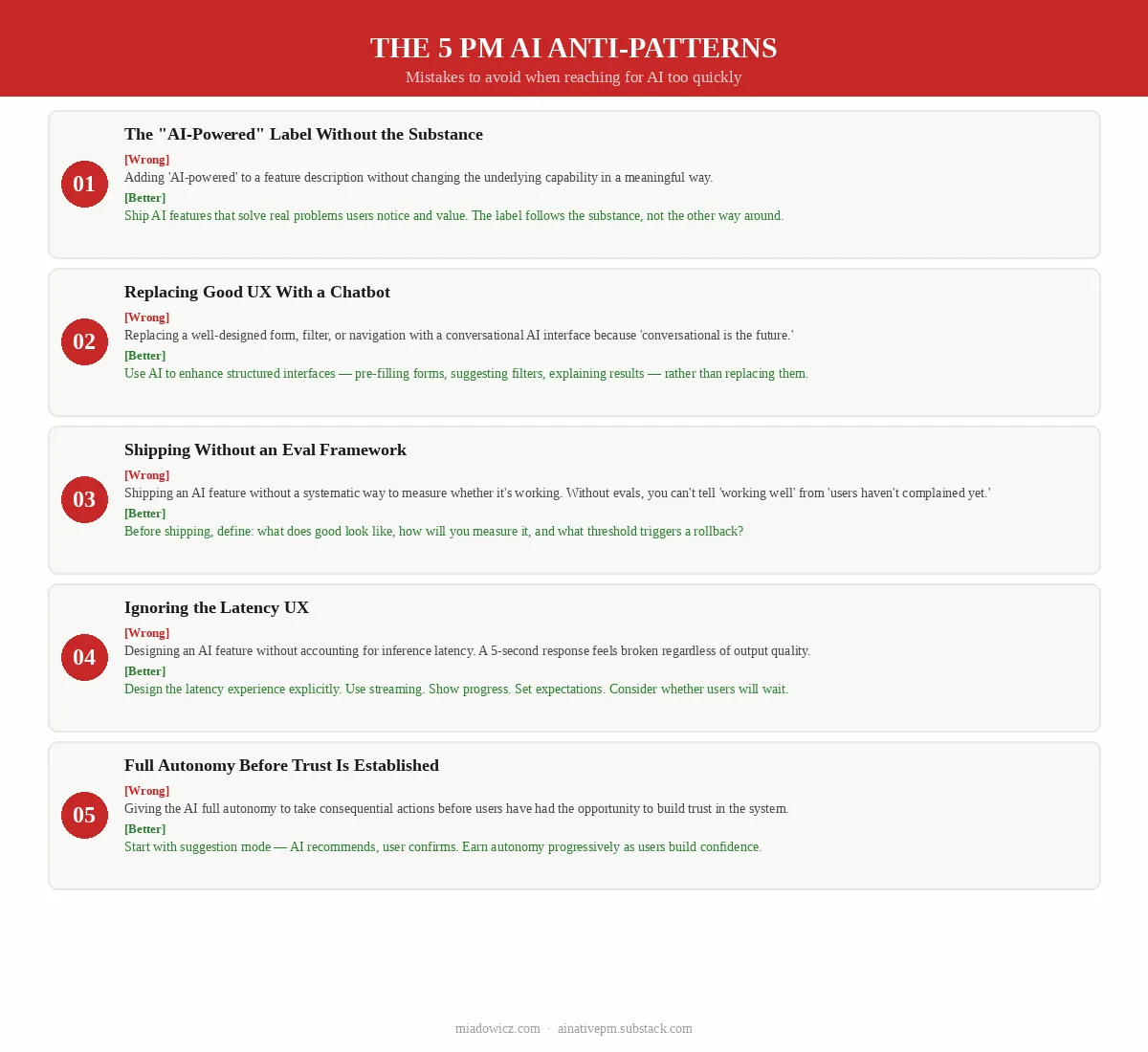
The PM AI Anti-Patterns
These are the mistakes I see most often when PMs reach for AI too quickly.
Anti-Pattern 1: The "AI-Powered" Label Without the Substance
[Wrong] Adding "AI-powered" to a feature description without changing the underlying capability in a meaningful way. This is marketing, not product. Users see through it quickly, and it erodes trust in your product's AI claims.
[Better] Ship AI features that solve real problems in ways that users notice and value. The label follows the substance, not the other way around.
Anti-Pattern 2: Replacing Good UX With a Chatbot
[Wrong] Replacing a well-designed form, filter, or navigation with a conversational AI interface because "conversational is the future."
[Better] Use AI to enhance structured interfaces - pre-filling forms from uploaded documents, suggesting filter combinations, explaining why a result appeared - rather than replacing them. Chat is one interaction pattern, not the only one.
Anti-Pattern 3: Shipping Without an Eval Framework
[Wrong] Shipping an AI feature without a systematic way to measure whether it's working. This is the most common and most expensive mistake. Without evals, you cannot distinguish between "the AI is working well" and "users haven't complained yet."
[Better] Before shipping any AI feature, define: what does good look like, how will you measure it, and what threshold triggers a rollback or redesign?
Anti-Pattern 4: Ignoring the Latency UX
[Wrong] Designing an AI feature without accounting for the latency of AI inference. A feature that takes 5 seconds to respond feels broken to users who expect sub-second interactions, regardless of the quality of the output.
[Better] Design the latency experience explicitly. Use streaming responses where possible. Show progress indicators. Set user expectations. Consider whether the task is one where users will wait (generating a document) or one where they won't (autocomplete).
Anti-Pattern 5: Full Autonomy Before Trust Is Established
[Wrong] Giving the AI full autonomy to take consequential actions before users have had the opportunity to build trust in the system. Even if the AI is technically reliable, users who haven't seen it work will be anxious about actions they can't review.
[Better] Start with suggestion mode - the AI recommends, the user confirms. Earn autonomy progressively as users build confidence in the system's reliability.
The Decision Tree
Run every potential AI feature through this tree before it touches a roadmap:
Is the user problem fuzzy or ambiguous?
  ├─ No → Solve with traditional product design
  └─ Yes ↓
Can users tolerate errors (or is there human review)?
  ├─ No → Traditional design, or AI with mandatory human review
  └─ Yes ↓
Do you have data/model access within your constraints?
  ├─ No → Reconsider scope or approach
  └─ Yes ↓
Is the cost (money, latency, maintenance) justified by value?
  ├─ No → Traditional design
  └─ Yes ↓
Does it fit users' mental model and trust level?
  ├─ No → Invest in UX design and trust-building before shipping
  └─ Yes → AI is the right approach. Define your evals and ship.
Summary: Default to Good Product Design. Add AI When It Earns Its Place.
The framework reduces to a simple principle: AI should earn its place in your product by solving a problem better than the alternative, at a cost that is justified by the value it creates.
The five questions are a forcing function for that discipline:
- Fuzzy or deterministic? - If deterministic, use traditional product design.
- Error tolerance? - Match AI autonomy to the consequence of failure.
- Data and model access? - Know what you need before you commit.
- Cost justified? - Account for money, latency, and maintenance.
- Mental model fit? - Design for how users think, not just what the AI can do.
The best AI PMs I know are not the ones who add AI to everything. They are the ones who know exactly when AI earns its place - and have the discipline to say no when it doesn't.
Before you add AI to your next feature, run it through this framework. You might save your team weeks of work, your company thousands of dollars, and your users a lot of frustration.